

Shopifyストアを運営していて、こんな壁にぶつかったことはありませんか?
- 「公式LINEを作ったけれど、友だち登録が全く増えない」
- 「告知バーやバナーを貼っているのに、お客様にスルーされてしまう」
- 「かといって、アプリでポップアップを出すと月額費用がかさむし、サイトも重くなる……」
先日、あるストアオーナー様から「洗練されたデザインで、かつ『しつこくない』LINE誘導ポップアップを自作したい」という切実なご相談をいただきました。
求められた要件は、非常にシビアで実践的なものでした。
- 「一度閉じた人には、24時間は中央に出さない」(UXを壊さないための必須条件)
- 「閉じた後は、右下に小さなバナーとして常駐させる」(後で登録したい人を逃さない)
- 「PCとスマホで画像を切り替えたい」(デバイスごとに最適な訴求をするため)
- 「エンジニアの手を借りず、管理画面から文言や色を自由に変えたい」
この要望をすべて叶え、アプリ代(月額数千円)をゼロにしながら、LINE登録率を劇的に改善するためのカスタマイズコードを開発しました。本記事でその全容を公開します。
1. このカスタマイズで得られる「3つの効果」
このポップアップを導入することで、単なる「登録者増」以上のメリットが得られます。
- 「あとで」を逃さない導線設計:ポップアップを閉じた後、右下に小さなバナーとして残る「2段階表示」を採用。買い物中に「やっぱりクーポン欲しい」と思ったお客様を逃しません。
- カゴ落ち対策:LINE友だちになることで、後からリマインドを送れるようになり、長期的なLTV(顧客生涯価値)が向上します。
- ブランド体験の維持:LocalStorageによる時間制御ロジックにより、「何度も出てきて邪魔」というネガティブな印象を与えません。
2. 実装手順:5分で終わる3ステップ
ステップ1:新しいセクションの作成
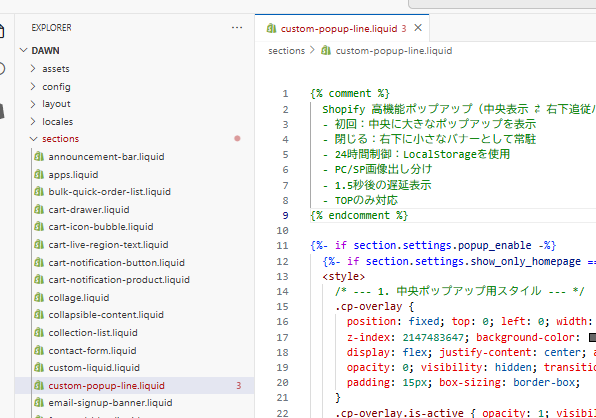
- Shopify管理画面から [オンラインストア] > [テーマ] > [コードを編集] を開きます。
- 左側のメニューの [Sections] フォルダにある 「新しいセクションを追加する」 をクリック。
- ファイル名をc_popup.liquidや custom-popup-line.liquid などと入力して作成します。
ステップ2:汎用テンプレートコードの貼り付け
作成したファイルの中身をすべて削除し、以下のコードをコピー&ペーストして保存してください。
※適宜、テーマに沿ったclass名など調整お願いします。テーマCSSの重複にご注意ください。
{% comment %}
  Shopify 高機能ポップアップ(中央表示 ⇄ 右下追従バナー切り替え)
  - 初回:中央に大きなポップアップを表示
  - 閉じる:右下に小さなバナーとして常駐
  - 24時間制御:LocalStorageを使用
  - PC/SP画像出し分け
  - 1.5秒後の遅延表示
  - TOPのみ対応
{% endcomment %}

{%- if section.settings.popup_enable -%}
  {%- if section.settings.show_only_homepage == false or request.page_type == 'index' -%}
  <style>
    /* --- 1. 中央ポップアップ用スタイル --- */
    .cp-overlay {
      position: fixed; top: 0; left: 0; width: 100%; height: 100%;
      z-index: 2147483647; background-color: rgba(0, 0, 0, 0.6);
      display: flex; justify-content: center; align-items: center;
      opacity: 0; visibility: hidden; transition: opacity 0.4s ease;
      padding: 15px; box-sizing: border-box;
    }
    .cp-overlay.is-active { opacity: 1; visibility: visible; }
    .cp-content {
      position: relative; width: 100%; max-width: {{ section.settings.popup_max_width }}px;
      max-height: 90vh; background-color: {{ section.settings.bg_color }};
      box-shadow: 0 10px 30px rgba(0,0,0,0.2); border-radius: 8px;
      display: flex; flex-direction: column; overflow: hidden;
    }
    .cp-scroll-wrapper { overflow-y: auto; width: 100%; height: 100%; -webkit-overflow-scrolling: touch; }
    .cp-close-icon {
      position: absolute; top: 12px; right: 12px; width: 34px; height: 34px;
      cursor: pointer; z-index: 30; display: flex; align-items: center; justify-content: center;
      background: rgba(255, 255, 255, 0.8); border-radius: 50%;
    }
    .cp-close-icon::before, .cp-close-icon::after {
      content: ''; position: absolute; width: 18px; height: 2px; background-color: #333;
    }
    .cp-close-icon::before { transform: rotate(45deg); }
    .cp-close-icon::after { transform: rotate(-45deg); }
    .cp-image-container img { width: 100%; height: auto; display: block; border: none; }
    .cp-img-pc { display: block !important; }
    .cp-img-sp { display: none !important; }
    .cp-text-area { padding: 25px; text-align: center; display: flex; flex-direction: column; gap: 15px; }
    .cp-divider { border-top: 1px dashed {{ section.settings.border_color }}; width: 100%; }
    .cp-main-text { font-size: 14px; color: {{ section.settings.text_color }}; margin: 0; line-height: 1.6; }
    .cp-offer-text { font-size: 28px; font-weight: bold; color: {{ section.settings.offer_color }}; margin: 0; line-height: 1.2; }
    .cp-button {
      display: block; width: 100%; padding: 16px 0; font-weight: bold; text-decoration: none !important;
      background-color: {{ section.settings.btn_bg_color }}; color: {{ section.settings.btn_text_color }} !important;
      border-radius: 4px; transition: 0.3s; border: none; cursor: pointer; text-align: center;
    }
    .cp-button:hover { opacity: 0.8; }
    .cp-close-link {
        background: none; border: none; text-decoration: underline; cursor: pointer;
        font-size: 12px; color: {{ section.settings.close_link_color }}; margin-top: 5px;
    }

    /* --- 2. 右下常駐バナー用スタイル --- */
    #cp-sticky-trigger {
      position: fixed; bottom: 20px; right: 20px; z-index: 2147483646;
      background-color: {{ section.settings.btn_bg_color }};
      color: {{ section.settings.btn_text_color }};
      padding: 12px 20px; border-radius: 50px; cursor: pointer;
      box-shadow: 0 4px 15px rgba(0,0,0,0.3); display: flex; align-items: center; gap: 10px;
      font-weight: bold; font-size: 14px; transform: translateX(150%); transition: transform 0.5s cubic-bezier(0.175, 0.885, 0.32, 1.275);
    }
    #cp-sticky-trigger.is-visible { transform: translateX(0); }
    #cp-sticky-trigger:hover { opacity: 0.9; transform: scale(1.05); }

    @media screen and (max-width: 768px) {
      .cp-content { max-width: 340px; }
      .cp-img-pc { display: none !important; }
      .cp-img-sp { display: block !important; }
      .cp-offer-text { font-size: 24px; }
      #cp-sticky-trigger { bottom: 85px; right: 10px; font-size: 12px; padding: 10px 15px; }
    }
  </style>

  <div class="cp-overlay" id="genericPopupOverlay">
    <div class="cp-content">
      <div class="cp-close-icon" data-popup-close></div>
      <div class="cp-scroll-wrapper">
        <div class="cp-image-container">
          <a href="{{ section.settings.link_url }}">
            {%- if section.settings.image_pc != blank -%}
              <img src="{{ section.settings.image_pc | image_url: width: 1000 }}" alt="PC" class="cp-img-pc" loading="lazy">
            {%- endif -%}
            {%- if section.settings.image_sp != blank -%}
              <img src="{{ section.settings.image_sp | image_url: width: 600 }}" alt="SP" class="cp-img-sp" loading="lazy">
            {%- elsif section.settings.image_pc != blank -%}
              <img src="{{ section.settings.image_pc | image_url: width: 600 }}" alt="SP" class="cp-img-sp" loading="lazy">
            {%- endif -%}
          </a>
        </div>
        <div class="cp-text-area">
          <div class="cp-divider"></div>
          <p class="cp-main-text">{{ section.settings.text_main | escape }}</p>
          <p class="cp-offer-text">{{ section.settings.text_offer | escape }}</p>
          <div class="cp-divider"></div>
          <a href="{{ section.settings.link_url }}" class="cp-button">{{ section.settings.text_btn | escape }}</a>
          <button class="cp-close-link" data-popup-close>{{ section.settings.text_close | escape }}</button>
        </div>
      </div>
    </div>
  </div>

  <div id="cp-sticky-trigger" onclick="showFullPopup()">
    <span>🎁 {{ section.settings.text_sticky | escape }}</span>
  </div>

  <script>
    (function() {
      const popup = document.getElementById('genericPopupOverlay');
      const sticky = document.getElementById('cp-sticky-trigger');
      const STORAGE_KEY = 'sp_popup_limit_{{ section.id }}';
      const DISMISSED_SESSION_KEY = 'sp_popup_dismissed';

      if (!popup) return;
      document.body.appendChild(popup);
      document.body.appendChild(sticky);

      window.showFullPopup = function() {
        popup.classList.add('is-active');
        sticky.classList.remove('is-visible');
        document.body.style.overflow = 'hidden';
      };

      const closePopup = (isUserAction = false) => {
        popup.classList.remove('is-active');
        document.body.style.overflow = '';
        sticky.classList.add('is-visible');
        if(isUserAction) {
          localStorage.setItem(STORAGE_KEY, new Date().getTime());
          sessionStorage.setItem(DISMISSED_SESSION_KEY, 'true');
        }
      };

      const lastShown = localStorage.getItem(STORAGE_KEY);
      const dismissedInSession = sessionStorage.getItem(DISMISSED_SESSION_KEY);
      const now = new Date().getTime();

      if (dismissedInSession === 'true') {
        sticky.classList.add('is-visible');
      } else if (!lastShown || (now - lastShown > 24 * 60 * 60 * 1000)) {
        setTimeout(showFullPopup, 1500);
      } else {
        sticky.classList.add('is-visible');
      }

      document.querySelectorAll('[data-popup-close]').forEach(el => {
        el.addEventListener('click', () => closePopup(true));
      });
      popup.addEventListener('click', (e) => { if (e.target === popup) closePopup(true); });
    })();
  </script>
  {%- endif -%}
{%- endif -%}

{% schema %}
{
  "name": "高機能ポップアップ",
  "settings": [
    { "type": "checkbox", "id": "popup_enable", "label": "有効にする", "default": true },
    { "type": "checkbox", "id": "show_only_homepage", "label": "トップページのみで表示", "default": true },
    { "type": "header", "content": "画像設定" },
    { "type": "image_picker", "id": "image_pc", "label": "画像 (PC)" },
    { "type": "image_picker", "id": "image_sp", "label": "画像 (スマホ)" },
    { "type": "header", "content": "テキスト設定" },
    { "type": "url", "id": "link_url", "label": "リンク先URL" },
    { "type": "textarea", "id": "text_main", "label": "案内テキスト", "default": "公式LINE友だち追加で" },
    { "type": "text", "id": "text_offer", "label": "特典内容", "default": "10% OFFクーポン" },
    { "type": "text", "id": "text_btn", "label": "ボタン文言", "default": "友だち追加する" },
    { "type": "text", "id": "text_close", "label": "閉じるリンク", "default": "特典を受け取らずに進む" },
    { "type": "text", "id": "text_sticky", "label": "右下バナー文言", "default": "限定特典をチェック" },
    { "type": "header", "content": "デザイン設定" },
    { "type": "range", "id": "popup_max_width", "min": 300, "max": 600, "step": 10, "unit": "px", "label": "幅", "default": 400 },
    { "type": "color", "id": "bg_color", "label": "背景色", "default": "#ffffff" },
    { "type": "color", "id": "text_color", "label": "文字色", "default": "#333333" },
    { "type": "color", "id": "offer_color", "label": "特典文字色", "default": "#E60012" },
    { "type": "color", "id": "border_color", "label": "区切り線色", "default": "#eeeeee" },
    { "type": "color", "id": "btn_bg_color", "label": "テーマカラー(ボタン・バナー)", "default": "#00B900" },
    { "type": "color", "id": "btn_text_color", "label": "ボタン文字色", "default": "#ffffff" },
    { "type": "color", "id": "close_link_color", "label": "閉じるリンク色", "default": "#999999" }
  ],
  "presets": [{ "name": "高機能ポップアップ" }]
}
{% endschema %}
ステップ3:カスタマイズ画面からの設定
- テーマのカスタマイズ画面(エディタ)を開きます。
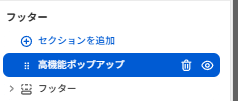
- 左サイドバーの 「セクションを追加」 をクリックし、一番下にある 「高機能ポップアップ」 を追加します。
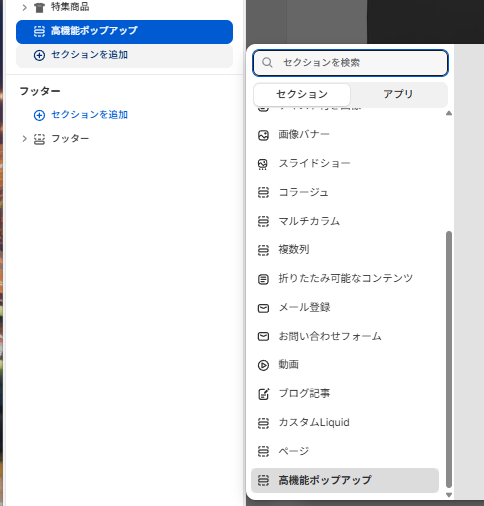
あとは直感的に、用意した画像をアップロードし、LINEのURLを入力するだけです。
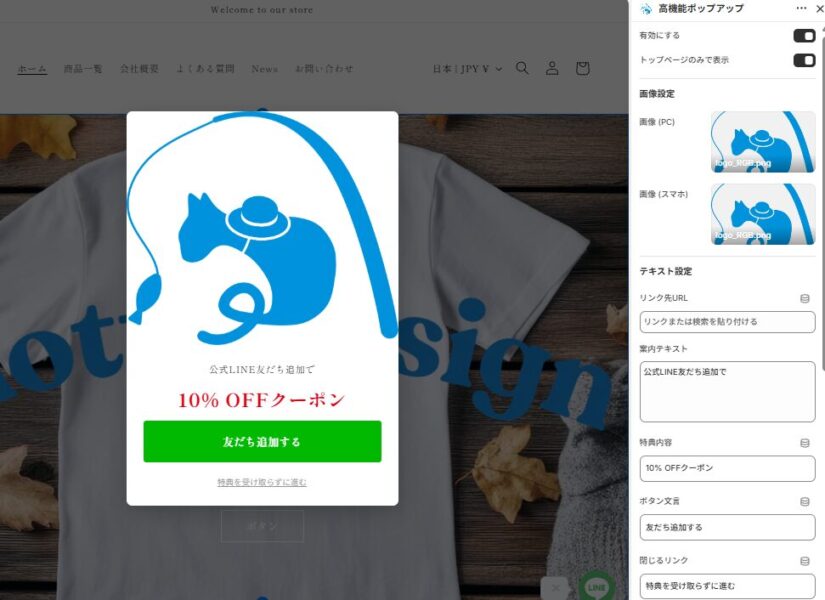
ポイント:PC用は横長、スマホ用は正方形に近い画像を用意すると、より美しく表示されます。色など文言も必要に応じて変更ください。
3. 【応用】全ページで表示させる方法
「トップページだけでなく、商品ページを見ている人にもLINE登録してほしい」という場合は、管理画面の設定一つで切り替えが可能です。
今回のコードには 「トップページのみで表示」 というチェックボックスを設けています。
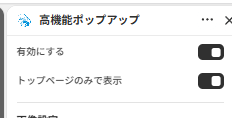
- チェックを入れる:トップページのみで表示。新規客へのインパクトを重視。
- チェックを外す:商品ページやブログ記事など、サイト内の全ページで動作。どのページから流入しても登録チャンスを逃しません。
【全ページ表示にする際のポイント】
全ページ表示にする場合は、テーマカスタマイズ画面の 「フッター」グループ または 「オーバーレイ」グループ(テーマによります)にこのセクションを追加すると、どのページに移動しても正しく動作します。
4. なぜこの「自作」がアプリより優れているのか?
① サイトスピード(SEO)への貢献
多くのアプリは外部サーバーからスクリプトを読み込むため、ページ表示速度(LCP)を低下させます。
このカスタマイズはShopifyのネイティブ環境で動くため、速度への影響はほぼゼロ。SEO対策としても有効です。
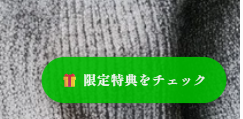
② 2段階表示の「おもてなし」設計
初回は中央に大きく。閉じたら右下に小さく。
この「引き際」と「再表示のしやすさ」の両立こそが、ユーザーに嫌われずに成約率(CVR)を高める秘訣です。
③ 24時間制限の「気遣い」
JavaScriptの localStorage を活用し、ブラウザがお客様の意思を記憶します。24時間は中央ポップアップを出さず、右下の小さなバナーだけでそっと寄り添う。このバランスが、ストアの信頼感を生みます。
5. まとめ
「公式LINEへの誘導」という小さな施策一つとっても、その実装方法でストアの質が変わります。
アプリで手軽に済ませるのも一つの方法ですが、今回のように「お客様のストレスを最小限にしつつ、確実にメッセージを届ける」仕組みを自前で持つことは、
長期的なストア運営において大きな資産になります。
ぜひこのポップアップを導入して、スマートにストアの「ファン」を増やしていってください!
カスタマイズのご相談はこちら
自社ストアに合わせたさらに細かな調整や、オリジナルの機能追加をご希望の方は、お気軽にお問い合わせください。
当ブログ お問い合わせフォーム
https://yurufuwacat.com/question/
MottuDesign公式HP CONTACTフォーム
https://mottu-design.com/contact/